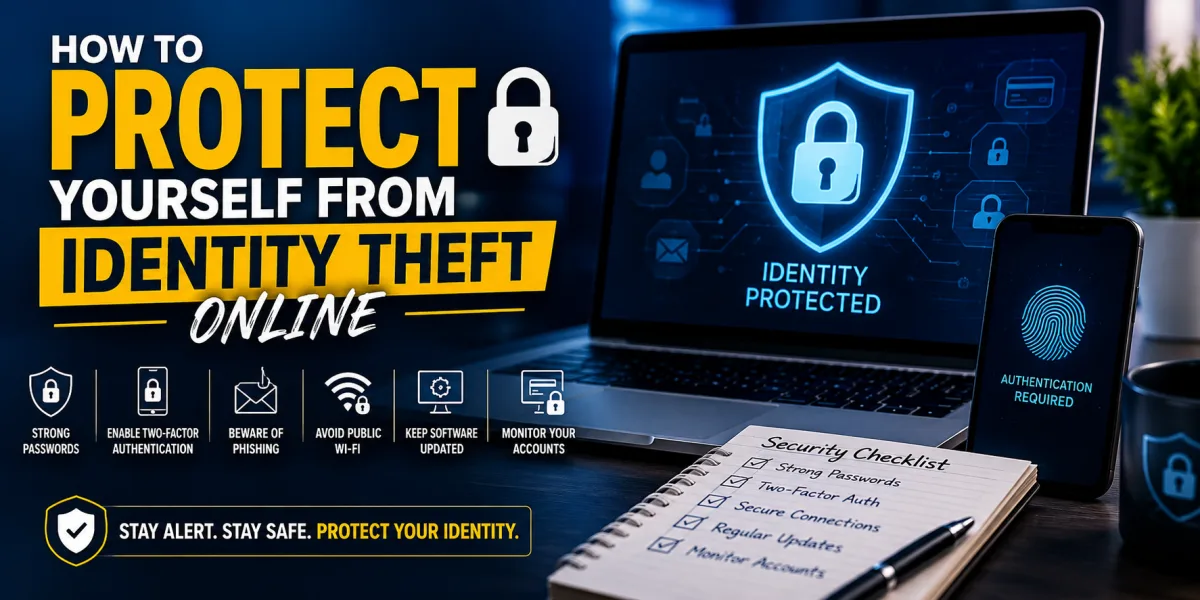
The Digital Lockbox: How to Protect Yourself from Identity Theft Online
Identity theft used to sound like a distant crime. Someone stole a wallet, intercepted mail, or used a forged signature. The modern version is faster, quieter, and more scalable. A criminal may never touch your physical documents. They may steal an email password, trick you into clicking a fake bank message, buy your Social Security number from a data breach, hijack your phone number, open a credit account in your name, file a fraudulent tax return, drain a payment app, or use personal details to impersonate you with a financial institution.
Online identity theft is not only a privacy problem. It is a financial threat. It can damage credit, delay loans, empty accounts, create tax problems, trigger debt collection, interrupt medical benefits, and consume months of recovery work. The money lost is painful. The time lost can be worse.
The Federal Trade Commission warned in 2026 that identity thieves can drain bank accounts, damage credit, and even block access to health benefits or tax refunds. The agency also noted that more than one million people reported identity theft to the FTC in the prior year, which shows how common the risk has become.
The most important lesson is that identity theft prevention is not one action. It is a layered defense. No single password, app, alert, freeze, or monitoring service can protect everything. The goal is to make your identity harder to steal, harder to use, and easier to recover if something goes wrong.
Think of your financial identity as a digital lockbox. Inside are your credit files, bank accounts, tax records, email, phone number, health information, government accounts, payment apps, passwords, and personal documents. Every weak point gives a criminal a possible entry. Protecting yourself means strengthening the lockbox from several sides: access control, monitoring, data minimization, fraud prevention, and response planning.
This is not about living in fear. It is about reducing avoidable risk. The internet rewards convenience, but criminals exploit convenience. Protecting your identity online requires slowing down at the moments when scammers want you to rush.
How Online Identity Theft Usually Happens
Identity theft can happen through many channels, but most schemes depend on one of three things: stolen data, stolen access, or stolen trust.
Stolen data comes from breaches, hacked companies, exposed databases, discarded documents, malware, public records, social media oversharing, or compromised devices. Once personal information is exposed, criminals can combine it with other details to impersonate you. They may already know your name, address, date of birth, email, phone number, employer, relatives, or fragments of financial information.
Stolen access happens when a criminal gets into one of your accounts. Email is especially dangerous because it often controls password resets for other accounts. If a thief controls your email, they may reset passwords, intercept security codes, hide alerts, and learn which banks, brokerages, payment apps, insurers, and retailers you use.
Stolen trust happens through social engineering. A scammer pretends to be your bank, a delivery company, a government agency, a job recruiter, a tech-support representative, a family member, a charity, a landlord, or even your employer. They create urgency and persuade you to reveal information, click a link, approve a login, send money, or install software.
The FTC states that scammers use emails and text messages to trick people into giving up personal and financial information, and its 2025 phishing guidance notes that email was the top contact method scammers used in 2024.
The mechanics change, but the pattern remains: criminals try to get information or access before you pause and verify.
Start with Your Email Account
Your email account is one of the most important identity assets you own. It may contain bank statements, tax forms, insurance documents, medical messages, travel records, password reset links, two-factor authentication notices, account alerts, and private conversations. If a criminal controls your email, they may not need to steal your wallet. They may already have the keys to your digital life.
Begin by securing your primary email with a strong, unique password. Do not reuse that password anywhere else. If another website is breached and you used the same password there, criminals may try it against your email account. This is called credential stuffing, and it works because people reuse passwords.
Next, enable multi-factor authentication. Multi-factor authentication, or MFA, requires more than a password to log in. CISA explains that using MFA protects accounts more than relying on a username and password alone, and that users who enable MFA are significantly less likely to be hacked.
Use an authenticator app or security key when possible. SMS text-message codes are better than no MFA, but they can be vulnerable to SIM swapping, phone-number theft, and phishing. For high-value accounts, phishing-resistant MFA such as a hardware security key can be stronger.
Review email account recovery settings. Remove old phone numbers and recovery email addresses you no longer control. Check forwarding rules to make sure no one has secretly set your email to forward to another address. Review logged-in devices. Sign out of devices you do not recognize.
If you secure only one account today, secure your email first.
Use a Password Manager
Most people cannot remember strong, unique passwords for every account. That is why they reuse passwords, modify the same password slightly, or store passwords insecurely. A password manager solves this by creating and storing unique passwords for each account.
A strong password manager allows you to use long, random passwords that are difficult to guess and impossible to reuse accidentally. You only need to remember the master password, which should be long, unique, and protected with MFA.
The benefit is not only convenience. It is containment. If one website is breached, only that password is exposed. Criminals cannot use the same password to enter your email, bank, brokerage, shopping account, or social media.
A password manager can also help detect fake websites. If your password manager does not offer to fill a saved password on a page that looks like your bank, that may be a warning sign that the site is not the real domain.
Do not store passwords in plain notes, spreadsheets, screenshots, browser bookmarks, or messages to yourself. If a criminal gains access to those locations, the damage can spread quickly.
Turn on Multi-Factor Authentication Everywhere Money Moves
Every financial account should have MFA enabled: bank accounts, credit cards, brokerage accounts, retirement accounts, payment apps, tax accounts, payroll portals, health insurance portals, online stores with saved cards, and email.
CISA describes MFA as protection beyond a username and password, requiring additional proof before account access is granted. This extra layer matters because stolen passwords are common. A password alone is no longer enough protection for accounts tied to money or identity.
Use stronger MFA for the most important accounts. A hardware security key is one of the strongest options where supported. Authenticator apps are usually stronger than SMS codes. Push notifications can be convenient, but they can also be abused through “MFA fatigue,” where a criminal repeatedly sends login prompts until the user approves one by mistake.
Never approve an MFA prompt you did not initiate. If you receive a login code or approval request unexpectedly, treat it as a warning. Change the account password from the official website or app, not from a link in a message.
Freeze Your Credit Before a Criminal Uses It
A credit freeze, also called a security freeze, restricts access to your credit report. This can make it much harder for someone to open new credit in your name because lenders typically need to check your credit before approving new accounts.
The Consumer Financial Protection Bureau explains that a credit freeze limits access to your credit report and that a fraud alert requires creditors to take steps to verify your identity before opening new accounts, issuing additional cards, or increasing limits based on a consumer request. An initial fraud alert lasts up to one year unless removed sooner.
A credit freeze is one of the strongest preventive actions because it does not wait for theft to happen. It blocks a common pathway criminals use: opening credit cards, loans, or financing accounts with stolen personal information.
To be effective, freeze your credit with all three major credit bureaus: Equifax, Experian, and TransUnion. Freezing only one bureau is incomplete because a lender may check another. Keep your freeze credentials in a secure place so you can temporarily lift the freeze when you apply for legitimate credit.
A freeze does not stop all identity theft. It will not prevent someone from using an existing stolen card, taking over a bank account, filing certain types of fraud, or misusing medical information. But it is a powerful defense against new-account credit fraud.
Use Fraud Alerts When Risk Is Elevated
A fraud alert is different from a freeze. A freeze restricts access to your credit file. A fraud alert tells creditors to take extra steps to verify your identity before opening new credit.
The CFPB says you can place an initial fraud alert on your credit report if you believe you are, or are about to become, a victim of fraud or identity theft, and that credit reporting companies keep the alert on your file for one year.
A fraud alert can be useful if your wallet was stolen, your personal information appeared in a breach, you clicked a suspicious link, or you suspect someone may try to use your identity. If you place a fraud alert with one major credit bureau, that bureau should notify the others.
For stronger prevention, many consumers use freezes as the default and fraud alerts after a specific incident. The right choice depends on your situation, but everyone should understand both tools before a crisis.
Check Your Credit Reports Regularly
Credit monitoring alerts can help, but they are not a substitute for reading your credit reports. Reports show accounts, balances, inquiries, addresses, collections, and payment history. Identity theft often appears there before the victim receives a bill or collection notice.
AnnualCreditReport.com is the official source for free credit reports from Equifax, Experian, and TransUnion. The site states that free weekly online credit reports are available and that reports can differ, which is why checking all three matters.
Look for accounts you do not recognize, hard inquiries you did not authorize, addresses that are not yours, balances that look wrong, collections you do not know, or accounts marked late that you paid. If something is inaccurate, dispute it promptly with the credit bureau and the company that supplied the information.
Credit reports are not exciting, but they are a financial early-warning system. A few minutes of review can reveal damage before it grows.
Recognize Phishing Before It Steals Your Identity
Phishing is one of the most common online identity theft methods because it attacks human behavior, not just technology. A message looks urgent, official, or personal. It asks you to click, verify, pay, call, download, or log in. The goal is to steal credentials, money, or information.
The FTC explains that scammers use email or text messages to trick people into giving personal and financial information and advises consumers to protect themselves by recognizing suspicious messages.
Phishing messages often create urgency. “Your account will be locked.” “Your package cannot be delivered.” “Suspicious activity detected.” “You owe taxes.” “Your subscription renewed.” “Your bank needs verification.” “Your payment failed.” The message wants you to act before thinking.
The safest habit is to avoid clicking links in unexpected messages. If a message claims to be from your bank, credit card company, payment app, delivery service, employer, or government agency, open the official app or type the official website yourself. Do not use the link in the message. If you need to call, use a number from the official website or the back of your card.
Never give passwords, one-time codes, PINs, or full Social Security numbers in response to an unexpected call, email, or text. A scammer may already have some information about you. Partial accuracy does not prove legitimacy.
Protect Your Phone Number
Your phone number is often used for account recovery, banking alerts, payment apps, and two-factor codes. That makes it valuable to criminals. In a SIM swap attack, a criminal convinces a mobile carrier to transfer your number to a device they control. Once they control the number, they may receive your texts and reset accounts.
Reduce this risk by setting a strong account PIN or port-out protection with your mobile carrier. Use an authenticator app or security key instead of SMS codes where possible. Remove your phone number from account recovery settings where stronger options are available.
Watch for warning signs: sudden loss of cell service, unexpected carrier messages, password reset notices, or login alerts. If your phone suddenly says “no service” for no clear reason and you receive security alerts, contact your carrier immediately from another phone.
A phone number feels personal, but in the digital financial system it functions like a security credential. Treat it that way.
Secure Your Banking and Payment Apps
Bank accounts, payment apps, and digital wallets deserve the highest level of protection. They should have unique passwords, MFA, transaction alerts, device alerts, and lock-screen protection.
Enable alerts for large purchases, transfers, ATM withdrawals, login from new devices, password changes, external account additions, and low balances. Alerts do not prevent every theft, but they reduce the time between fraud and discovery. Time matters. The faster you catch unauthorized activity, the faster you can limit damage.
Review linked accounts. Payment apps often connect to bank accounts, debit cards, credit cards, and contacts. Remove connections you no longer use. Avoid keeping large balances in payment apps unless necessary. Transfer money to insured accounts when appropriate.
Be careful with peer-to-peer payment apps. Scammers may impersonate relatives, sellers, landlords, charities, or customer support representatives. Payment app transfers can be difficult to reverse, especially if you authorized the payment. Treat payment app transactions like cash unless you know and trust the recipient.
Do Not Overshare Personal Information Online
Identity theft often depends on details people reveal voluntarily. Birthdays, pet names, childhood streets, schools, employers, family members, vacation plans, children’s names, and personal milestones can help criminals guess passwords, answer security questions, impersonate you, or target scams.
Social media quizzes are especially risky when they ask for nostalgic details: first car, childhood nickname, favorite teacher, first job, mother’s maiden name, or the street you grew up on. These details may resemble account-recovery questions.
Review privacy settings on social media. Limit who can see your posts, friend list, contact information, birth date, location, and old photos. Be cautious about posting travel plans in real time, especially if your home address is discoverable.
For security questions, do not use truthful answers that can be found online. Consider using random answers stored in your password manager. If a site asks for your first school, the answer does not need to be your actual first school. It needs to be something you can reproduce securely.
Keep Devices Updated
Your phone, computer, tablet, router, and apps need regular updates. Updates often patch security vulnerabilities that criminals can exploit. Delaying updates may leave known weaknesses open.
Enable automatic updates where practical. Update browsers, operating systems, banking apps, password managers, antivirus software, and routers. Remove apps you no longer use. Old apps with poor security can become entry points.
Use screen locks on every device. A strong passcode is better than a simple pattern or short PIN. Enable biometric access where appropriate, but keep the underlying passcode strong. If your phone is stolen and unlocked, your financial life may be exposed.
Do not install unknown apps or browser extensions casually. Extensions can read browsing activity, alter webpages, or capture information depending on permissions. Download apps only from trusted sources, and review permissions before granting access to contacts, photos, microphone, camera, or location.
Secure Your Home Wi-Fi
Home Wi-Fi is part of your identity protection system because it carries banking, email, shopping, work, and personal data. Change the default router password. Use strong Wi-Fi encryption. Create a strong network password. Keep router firmware updated.
Separate smart devices from primary devices if your router supports a guest network. Internet-connected cameras, speakers, doorbells, thermostats, and appliances may not have the same security quality as computers and phones. A separate network can limit risk.
Avoid doing sensitive financial work on public Wi-Fi unless you use a trusted secure connection. Public networks in airports, hotels, cafés, and libraries can be risky. If you must use them, avoid logging into financial accounts or entering sensitive information. Use your mobile data connection when possible.
Protect Tax and Government Accounts
Tax identity theft can be especially damaging. A criminal may use your information to file a fraudulent tax return and claim a refund. You may discover the problem only when your legitimate return is rejected or delayed.
Create secure online accounts with tax authorities and government benefit portals before a criminal tries to. Use strong unique passwords and MFA. Store tax documents securely. Be cautious with emails claiming to be from tax agencies, especially messages demanding immediate payment or offering unexpected refunds.
Government agencies generally do not ask for sensitive information through random text messages or emails. When in doubt, go directly to the official website or call an official number.
Keep prior-year tax returns, wage statements, and identity documents in secure storage. These documents contain enough information to support many types of fraud.
Protect Medical Identity
Medical identity theft happens when someone uses your information to receive care, prescription drugs, insurance payments, or medical equipment. This can create bills, insurance problems, and even inaccurate medical records.
Review insurance explanation-of-benefits statements. Watch for providers you did not visit, services you did not receive, prescriptions you did not fill, or claims from unfamiliar locations. Keep health insurance cards secure. Do not share policy numbers casually.
Medical identity theft can be harder to detect than credit fraud because it may not appear on credit reports immediately. The warning may come as an insurance denial, medical bill, collection notice, or confusing medical record.
If you see suspicious medical activity, contact the provider, insurer, and relevant privacy office quickly. Request corrections to records where needed. Keep written documentation.
Be Careful with Data Breach Notices
Data breach notices have become common enough that many people ignore them. That is dangerous. A breach notice may mean your name, email, password, Social Security number, date of birth, address, health data, account number, or other sensitive information was exposed.
If you receive a legitimate breach notice, read what information was exposed. Change affected passwords. If a password was reused elsewhere, change it everywhere. Enable MFA. Watch financial accounts. Consider freezing credit if sensitive identity information was exposed.
IdentityTheft.gov provides a data-breach guidance page to help people decide what to do if information was lost or stolen.
Be cautious, though: criminals may send fake breach notices to lure victims into clicking links. If you receive a notice, go to the company’s official website directly rather than clicking email links.
Use Account Alerts as Tripwires
Account alerts are simple but powerful. They act like tripwires. You may not stop every unauthorized action, but you can know quickly when something happens.
Set alerts for bank withdrawals, credit card purchases, balance changes, new payees, password changes, login from new devices, address changes, credit-limit changes, international transactions, and debit card use. Many financial institutions allow alerts by app notification, text, or email.
Use alerts for your credit card even if you rarely use it. A dormant account can be compromised without your noticing. A purchase alert can reveal misuse immediately.
Do not ignore alerts. If you receive one you do not recognize, log in through the official app or website and investigate. Do not reply to the alert or click a suspicious link unless you are certain it is genuine.
Reduce Stored Payment Information
Convenience creates exposure. Every online store that saves your card is another place where account takeover or unauthorized ordering can happen. Every app with stored payment information is another potential target.
Review saved cards in shopping accounts, food delivery apps, ride-sharing apps, subscription services, gaming accounts, app stores, cloud platforms, and travel sites. Remove cards from services you rarely use. Close accounts you no longer need.
Consider using credit cards instead of debit cards for online purchases when possible, because credit cards often provide stronger dispute protections and do not pull money directly from your checking account. Still, card protections vary, and you must report unauthorized activity promptly.
Use virtual card numbers where available. Some issuers allow temporary or merchant-specific card numbers, limiting damage if a merchant account is compromised.
Protect Children and Older Adults
Children can be attractive identity theft targets because their credit files are often unused and fraud may go unnoticed for years. A criminal who uses a child’s Social Security number may create problems that surface only when the child later applies for financial aid, a job, apartment, or credit.
Parents should limit where children’s personal information is shared, protect school and medical documents, and consider freezing a child’s credit if available. Watch for mail addressed to a child from banks, credit cards, debt collectors, or government agencies.
Older adults may be targeted through impersonation scams, tech-support scams, romance scams, investment schemes, and caregiver exploitation. The FTC reported that older adults reported losing more than $3 billion to fraud in 2025, underscoring the financial scale of the problem.
Families should discuss scams without shame. Scammers are professionals. The goal is not to make vulnerable people feel foolish; it is to create verification habits. Before sending money, sharing information, installing software, or responding to urgent messages, pause and verify with a trusted person.
Identity Theft Protection Services: Useful, but Not Magic
Identity theft protection services can monitor credit files, dark web data, public records, account activity, address changes, and suspicious use of personal information. Some include identity restoration support and insurance for eligible expenses.
These services can be useful, especially for busy households, breach victims, families, or people who want help monitoring multiple signals. But they do not prevent all identity theft. They usually alert you after data has appeared or suspicious activity has occurred. They cannot stop every scam, secure every password, or replace credit freezes.
Do not pay for identity protection while ignoring free, high-impact steps: freeze credit, secure email, use MFA, check reports, use a password manager, and monitor accounts. Paid services should supplement your defenses, not substitute for them.
What to Do If Your Identity Is Stolen
If identity theft happens, speed and documentation matter. Start by securing the accounts involved. Change passwords from a clean device. Revoke suspicious sessions. Enable or reset MFA. Contact the financial institution, card issuer, payment app, or company where the fraud occurred.
Then report the identity theft. IdentityTheft.gov is the federal government’s one-stop resource to help people report and recover from identity theft. The site creates a recovery plan and can pre-fill forms and letters.
The FTC also says consumers can report identity theft at IdentityTheft.gov and that the site provides step-by-step advice, checklists, and sample letters.
Place a fraud alert or freeze your credit if you have not already. Review all three credit reports. Dispute fraudulent accounts or incorrect information. File a police report if needed, especially if creditors, debt collectors, or institutions request it. Keep copies of every report, letter, confirmation number, and conversation note.
Create a recovery folder. Identity theft recovery can involve repeated calls and documents. A written record helps you stay organized and prove what happened.
A Practical Identity Theft Defense Plan
Start with the accounts that control everything else. Secure your email, phone account, bank accounts, brokerage accounts, tax accounts, and password manager. Use unique passwords and MFA.
Then freeze your credit at all three major bureaus. Keep the freeze credentials secure so you can lift them when needed.
Next, review your credit reports. Look for unfamiliar accounts, inquiries, addresses, and collections. Repeat this periodically.
Set alerts on every financial account. Watch for new logins, transfers, card use, and profile changes.
Reduce your data footprint. Remove saved cards where unnecessary. Delete unused accounts. Limit public personal information. Stop answering social media quizzes that reveal security-question details.
Update devices and secure your home Wi-Fi. A weak device can undermine strong account settings.
Practice verification. If a message, call, or email creates urgency, stop. Contact the company directly through official channels.
Finally, know where to go if something happens. IdentityTheft.gov should be part of your emergency plan, not something you discover after panic sets in.
The Financial Discipline Behind Identity Protection
Identity protection is part of financial discipline. It belongs beside budgeting, saving, investing, insurance, and estate planning because identity is the access layer to your financial life. If criminals can impersonate you, they can attack the systems you use to build wealth.
A strong financial life is not only about earning more or investing better. It is also about protecting what has already been built. A high credit score can be damaged by fraudulent accounts. An emergency fund can be drained through account takeover. A tax refund can be stolen through identity fraud. A retirement account can be targeted through email compromise.
The goal is not perfection. No individual can eliminate every risk in a digital economy where companies, agencies, and platforms hold enormous amounts of personal data. But individuals can reduce exposure, strengthen authentication, monitor early warnings, and respond quickly.
Identity thieves prefer easy targets. Reused passwords, unsecured email, no MFA, unfrozen credit, ignored breach notices, overshared personal details, and unmonitored accounts make the work easier. Each defensive step raises the cost of attacking you.
The Digital Lockbox
Your identity is now a financial asset. It opens accounts, proves eligibility, supports borrowing, receives benefits, files taxes, accesses healthcare, and connects you to your money. Protecting it is not optional.
Use strong unique passwords. Enable multi-factor authentication. Freeze your credit. Monitor reports. Secure email. Protect your phone number. Question urgent messages. Update devices. Limit oversharing. Watch account alerts. Know how to report fraud.
These actions are not dramatic. They are ordinary habits. That is why they work. Online identity theft often succeeds not because criminals are brilliant, but because victims are rushed, tired, trusting, distracted, or unprepared.
A digital lockbox does not need to be complicated. It needs layers. The more layers you build before a thief arrives, the harder your identity becomes to steal and the faster you can recover if something breaks through.
 Article
 Article
 Article
 Article
 Article
 Article
 Article
 Article